
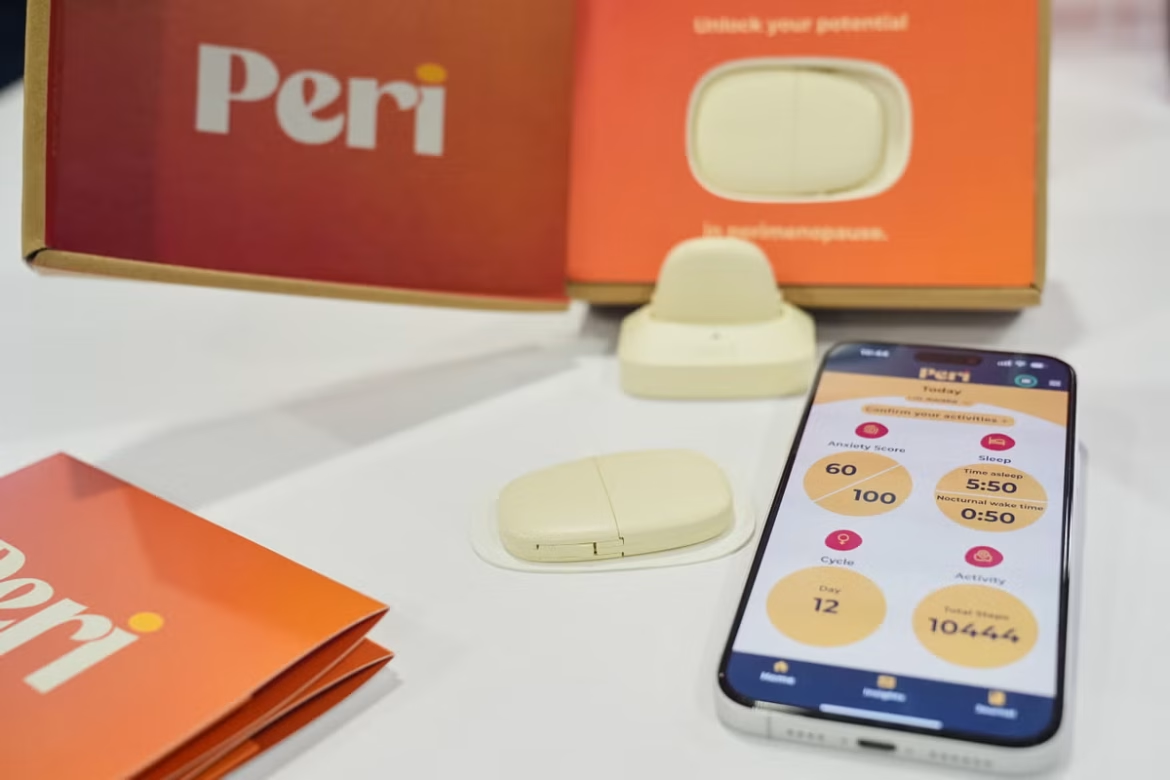
Health tech gadgets displayed at the annual CES trade show make a lot of promises. A smart scale promoted a healthier lifestyle by scanning your feet to track your heart health, and an egg-shaped hormone tracker uses AI to help you figure out the best time to conceive.
Tech and health experts, however, question the accuracy of products like these and warn of data privacy issues — especially as the federal government eases up on regulation.
The Food and Drug Administration announced during the annual show in Las Vegas that it will relax regulations on “low-risk” general wellness products such as heart monitors and wheelchairs. It’s the latest step President Donald Trump‘s administration has taken to remove barriers for AI innovation and use. The White House repealed former President Joe Biden‘s executive order establishing guardrails around AI, and last month, the Department of Health and Human Services outlined its strategy to expand its use of AI.
Booths at the conference showcased new tech designed to help people living in rural areas with their health care needs amid doctor shortages, boost research into women’s health and make life easier for people with disabilities.
AI technologies have benefits in the over $4.3 trillion health care industry, according to Marschall Runge, professor of medical science at the University of Michigan. They’re good at analyzing medical imaging and can help streamline doctors’ busy schedules, but they can also promote biases and “hallucinate,” providing incorrect information stated as fact.
“I would urge people not to think that the technology is the same as a well-resourced, thoughtful, research-driven medical professional,” said Cindy Cohn, executive director of the digital rights group Electronic Frontier Foundation.
Privacy protections like the Health Insurance Portability and Accountability Act do not cover information collected by consumer devices, and the companies could be using the data to train their AI models, or selling it to other businesses, Cohn said.
With a lot of the gadgets at CES, it’s difficult to find out where your information is going, Cohn said.
“You have to dig down through the fine print to try to figure that out, and I just don’t think that’s fair or right for the people who might rely on it,” she said.
But the creators of the products say their innovations fill in health care gaps, and they maintain they protect their customers’ privacy.
Sylvia Kang, founder and CEO of Mira, said she created the egg-shaped hormone tracker because many of her friends were trying to conceive and realized they had no knowledge of their hormonal health. To use the “world’s mini hormone lab,” you dip a wand in urine, insert the wand into the monitor and look at the results on the app.
Kang said her company uses AI to analyze female hormone data and has one of the world’s biggest hormonal health banks. The data is stored on the cloud and is not shared with anyone, Kang said.
“There was no such thing before,” Kang said of her $250 product.
Many gadgets at CES focused on women’s health, which has been historically under-researched and underfunded. Before 1993, women were excluded from clinical trials, and there still is little research on areas like menopause.
While not every woman will have a baby, all women go through menopause, and “yet we know nothing about it,” said Amy Divaraniya, founder and CEO of the women’s health company Oova, during a session.
One gadget called Peri aims to better understand perimenopause — the transitional phase before menopause. The wearable device monitors hot flashes and night sweats and provides the data via an app.
Improving accessibility to health care
Other products at CES were promoted as a way to increase accessibility to health information. The free medicine-focused AI chatbot called 0xmd helps improve access to medical information in areas with doctor shortages and provides a cost-effective alternative, said its founder and architect Allen Au. People can ask the chatbot questions about medicine, upload photos of a mole or rash, and submit their doctors’ notes for an easier-to-understand translation, Au said.
“At the end of the day, I don’t think we will replace doctors,” but it can give people a second opinion, Au said.
OpenAI announced on Wednesday its launch of ChatGPT Health, a similar platform.
Cohn remains skeptical of consumer tech. She said they can help prepare people to ask the right questions of their medical professional, but they’re not going to be a substitute for a doctor.
“People need to remember that these are just tools; they’re not oracles who are delivering truths,” she said.
