
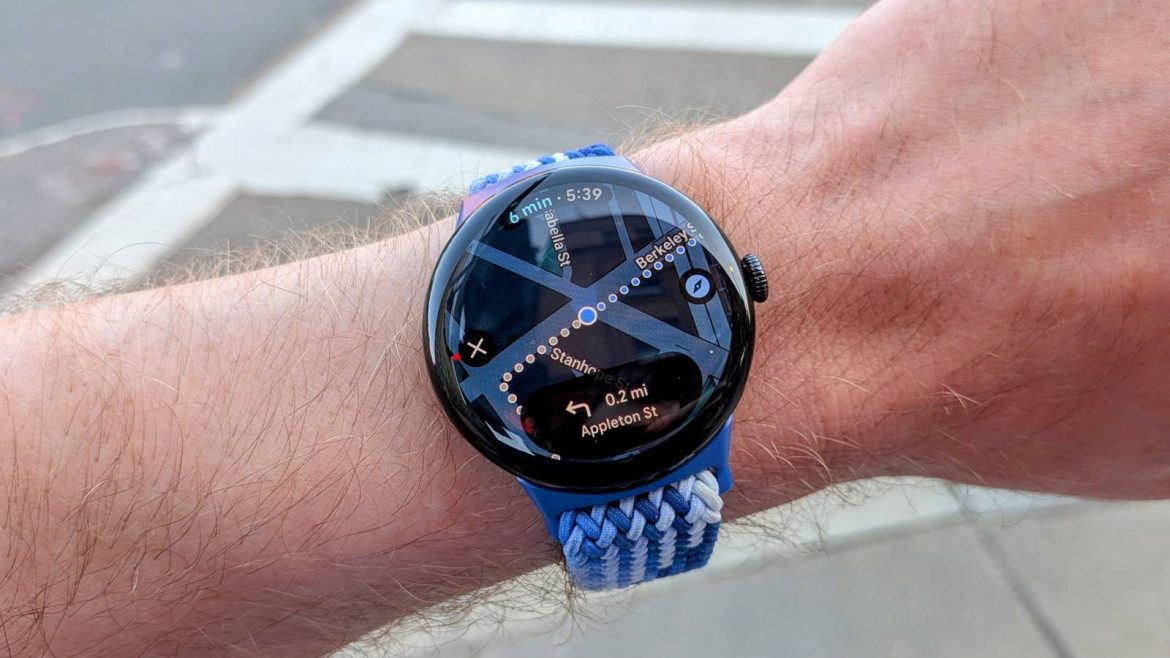
Traveling to a new place is exciting, but—at least for me—it also brings some anxiety. I hate to feel lost, but what I really hate is looking lost. That’s why wearing a smartwatch has become incredibly important in my travels. Allow me to explain.
For most of my life, I haven’t done much travel, but that’s changed a bit in the last few years. I ventured overseas for the first time in my life, and I’ve been trying to visit more U.S. cities outside of my state (most recently, Boston). While I’m certainly no Rick Steves, I’ve learned a few things about traveling with tech.
Walking directions where they should be
No one wants to look like a lost puppy

It may sound weird, but one of my favorite things to do in a new city is walk. I don’t live in a particularly walkable area, so it’s always a pleasure to be able to get to places without needing a car. That being said, I’m not the best at navigating—Google Maps walking directions are a must.
There are a couple of problems with using walking directions on my phone. First, I want to enjoy the sights and sounds around me, not be looking down at a screen. Second, I don’t like looking like a lost tourist, and while I’m sure no one cares, pulling out my phone to check the map every block makes me self-conscious.

Both of these issues were in full play when I traveled to Europe last year. I was surrounded by beautiful architecture, and it was my first time in a place where I didn’t speak the native language—I wanted to blend in as much as possible. Walking directions on my Pixel Watch were a game-changer.
I love being able to walk around with my head up as if I haven’t a care in the world, knowing my watch will buzz when I need to change direction. When that happens, all I have to do is raise my wrist, and I can easily see my next move. If I’m ever feeling a bit uncertain, I can also pop into the map view and make sure I’m walking in the right direction.
Use public transit like a local
It’s not as complicated as I thought

As I said, I don’t live in a very walkable area, and public transit is almost non-existent. I was pretty nervous about using public transit in Europe. It’s just not something I’m familiar with, not to mention none of it would be in English.
While I had experience with walking directions, this was truly my first time using Google Maps for public transit. I have to admit that seeing all the color-coded lines and station names felt like magic. But what’s even more magic is combining public transit and walking directions on my Pixel Watch.
Once again, I don’t want to be standing around in a train station, looking up and down from my phone to the transit signs—especially if my hands are full with bags and luggage. It’s super nice to just glance at my watch and see a blue 2, for example, and instantly know what to look for. Then, once you’re on the bus, train, or ferry, it’s easy to see how many stops until you need to get off.
Never too late to learn new skills
Now that I have more experience getting around big cities with walking directions and public transit, I’ve learned that I’m actually pretty good at it. I’m notoriously bad with navigation when it comes to driving, but for some reason, give me a couple of days in a proper city, and I’ll feel familiar with the train map.
This is the entire point of technology, after all—to make our lives easier. A smartwatch on my wrist gives me confidence and helps me get out of my head so I can enjoy being in a new place. There was a time in my life when a smartwatch charger felt like an unnecessary extra thing to pack, but now it’s my most important bit of kit.


8/10
- Heart Rate Monitor
-
Yes
- Color Screen
-
Yes
The Pixel Watch 4 is made to work seamlessly with your Pixel (or other Android) device. The domed display offers a fantastic view of anything you need on your smartwatch, from the time to in-depth fitness insights.
