
We may receive a commission on purchases made from links.
Video games are a massive pastime all over the world, and like anything that’s become incredibly popular, things have started to homogenize. There are basically three mainstream ways people interact with games: mouse and keyboard, controller, or touch screen. But there are plenty of off-beat gaming accessories out there that can give you a more immersive way to play, or simply improve your gameplay experience.
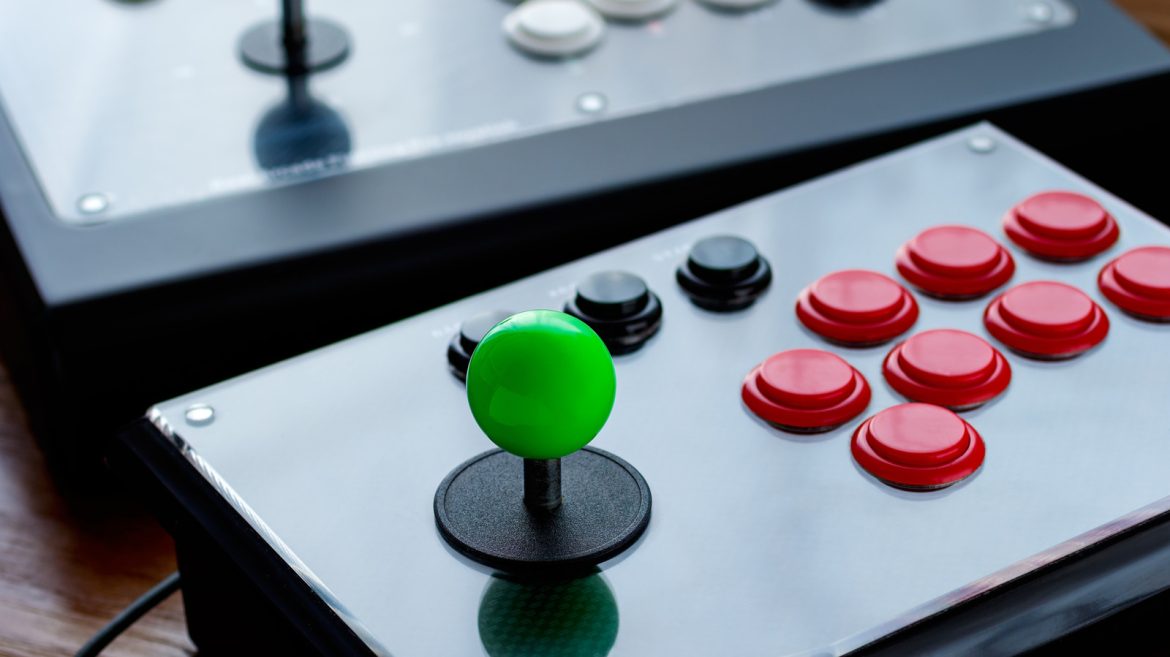
On the safe side of the spectrum, we have the arcade fight sticks pictured above. Personally, I use an 8Bitdo Retro Arcade Fight Stick for all my fighting and arcade game needs. Once you’ve played Street Fighter II or Metal Slug using the type of controller the game was designed for, there’s no going back, and it’s a great starter stick because you can upgrade it to competition standards at an affordable price if you like.
However, that’s just dipping your very tippy toes in the waters of oddly useful gaming accessories. If you’re dedicated to getting exactly the right tools for the game you love, then perhaps one of these gaming accessories will make it onto your wishlist.
Gaming keypads that replace or augment your keyboard
Most PC gaming enthusiasts choose mechanical keyboards, but one-handed keyboards are a seriously underrated alternative to a full mechanical keyboard. You can find these devices in mechanical, opto-mechanical, and mecha-membrane variants, but the real draw is the ergonomic value proposition.
These keyboards allow you to rest your palm in a single position and reach every button with minimal movement. That makes them excellent for Massively Multiplayer Online games (MMOs), Real-Time Strategy (RTS) titles, and first-person shooter games. It’s mainly MMO reviewers that recommend these keyboards, as mainstream players don’t seem to see the point. However, gaming laptops are becoming more popular these days, and this is where something like the above Razer Tartarus V2 really shines.
As we noted when we listed these one-handed keyboards as essential gadgets for gaming on the go, these devices solve a significant gaming laptop issue. Specifically, it’s not possible to have both a comfortable keyboard wrist angle and look at the laptop’s screen head-on. Something like the Tartarus is compact enough to throw in your laptop bag, and allows you to position the laptop itself optimally without hurting your keyboard ergonomics. If you need a key that’s only available on a full keyboard, you can either remap it or just reach over and press it. This is usually for things like opening the inventory or a quest log, not active gameplay. So it’s the best of both worlds.
Foot pedals for push-to-talk and macros
Did you know that there are people out there who have beaten games like Dark Souls using nothing but their feet? And here you are not even using your feet at all! Jokes aside, there are plenty of gaming use cases for foot-operated controls. The most mundane examples include pedals for car racing or rudder controls for flight and space sims.
But gaming has evolved beyond just playing the game itself. For many people, streaming their gameplay is a big part of the hobby, which is why gadgets like the Elgato Stream Deck Pedal exist. It allows you to do things like mute your mic or trigger a transition in your stream without removing your hands from your mouse and keyboard.
But you don’t have to buy such a pricey device if you just need a foot-operated macro board. The iKKEGOL USB foot pedal is a great example of a handy computer gadget that can speed up your daily tasks, in this case by acting as a macro pad. The only real difference is that the buttons are on the floor. Even if you don’t stream, you might have specific things you do while playing competitively in your favorite games that would be better if you didn’t have to lift your hands from the controls. Honestly, the sky’s the limit, and you weren’t doing anything important with your feet anyway, right?
Trackball mice for gaming
You might be slightly surprised that trackball mice are still a thing. They were quite common on laptops before the advent of modern trackpads, but were never that common on desktop systems. Yet the modern trackball mouse has carved out a decent niche for itself. The Logitech Ergo M575S has been called a game-changer for wrist pain, and I can personally attest to how my MX Ergo S has all but eliminated my wrist pain after switching to it as my work mouse. But what about gaming?
Well, it turns out that a trackball might be better for gaming than you’d assume. A modern trackball is quite serviceable for playing even single-player first-person shooters. It’s not the ideal genre of game for the device to tackle, but it works. Games like Baldur’s Gate 3 or any RTS games work perfectly well with a trackball, and, of course, you get all the ergonomic benefits of this design.
Where trackballs really shine, however, is with couch gaming. It might not be as good as a traditional mouse for gaming, but it can be far superior to the analog sticks on typical game controllers, depending on the game. So if you play PC games from the couch, it’s a great solution. Modern consoles support USB mice, so if your trackball has the option to use a USB dongle and the games you want to play on the console support it, you don’t even have to be a PC gamer to benefit. The ELECOM IST PRO offers a 2.4-gigahertz USB dongle as an option, for example.
Gaming pillows with built-in speakers
There was a time when the ultimate high-end gaming audio solution was a 5.1 surround sound system. These days, it seems gamers are all about wearing headsets, but that’s not something everyone is comfortable with, especially if you like having long gaming sessions. Just the clamping force of some headphones can give you a sore head.
So why not combine audio with the comfort of a head cushion? It seems like an obvious idea, given that there are plenty of modern cars that have speakers in the headrest, but you don’t actually see much of that in the PC space. The Razer Clio is the key example here, since it’s from a well-known brand and a premium product, something that’s clear from the rather beefy price! You can get generic neck pillows with speakers built in, but the Clio is gaming-specific and has some interesting features to that end.
You can use the Clio as a regular stereo speaker system, moving the audio right next to your ears. The near-field speakers are full-range, and you don’t need to crank the volume very high to hear everything. This means it’s a good compromise between wearing a headset and avoiding your neighbours banging on the wall at two in the morning. However, this pillow can also act as the rear channels in a surround setup in tandem with your front stereo speakers, which means you can get real surround sound without satellite speakers and their wires cluttering up your gaming space.
MMO mice with many, MANY buttons
MMO players like one-handed keypads, and they also love their MMO mice. These are like regular computer mice, but they answer the question of how many buttons you can squeeze into a mouse before it becomes completely unusable.
One of the best MMO mice is the Razer Naga V2 Pro. Also, the excellent Corsair Scimitar Pro has made our own list of best gaming mice. The Scimitar has 12 buttons, and the Razer has an extraordinary 20 programmable buttons. The Razer also has this incredible feature where you can change out the side plates to alter the number of buttons and its layout.
The thing is, you don’t have to be an MMO player to benefit from using these MMO-style mice. Like a one-handed keyboard, this is a peripheral that makes it unnecessary to lift your left hand to hit keys on the right side of the keyboard. Whether you’re playing single-player or multiplayer games, there are secondary functions like opening your inventory or activating power-ups that would usually have keys on the right side of the keyboard, which you can now map to the keys under your thumb on the side of the mouse instead. That also makes it a good accessory for laptops for the same reasons we suggested one-handed keyboards earlier. Specifically, it frees you from having to access the laptop’s built-in keyboard and lets you find the most ergonomic setup for your needs.
Eye-tracking gaming hardware
When you think of using your head or eye movements to interact with a game, you probably immediately think of virtual reality (VR) headsets like the Meta Quest 3 or Sony’s PS VR 2, the latter of which actually contains eye-tracking technology. However, you don’t need a headset to use your head or your eyes for input. You can use a device like the Tobii Eye Tracker to enhance games with your eye and head movement.
I once had an Alienware laptop with a Tobii eye tracker built in, and it’s a surprisingly intuitive solution. Combine it with games like Microsoft Flight Simulator or Euro Truck Simulator 2, and you get most of the control benefits of VR without having to wear a headset for hours. By glancing at things, you can highlight them, and if you turn your head slightly, you can look around the cockpit or cabin of your virtual vehicle in a way that quickly becomes second nature.
It’s certainly a niche device that’s mainly going to appeal to the simulation gaming crowd. But if those are the sorts of games you’re into and you’re not a fan of wearing a stuffy VR headset (or your games don’t support VR), then an eye tracker could be the perfect solution.
VR treadmills
VR technology has come a long way. You don’t need to have a wire trailing to a computer anymore, and we’ve been free of external tracking cameras for a while, so you can easily set up your VR sessions in large spaces. This allows for truly immersive experiences, but, in the end, you’ll run into very real walls and obstacles eventually. If you really want to have the freedom to walk through the virtual world endlessly without seeing the VR guardrails pop up, an omnidirectional treadmill is the next best thing to plugging into the Matrix.
These devices let you turn and walk (or run) in any direction while staying in the same spot. Some models let you crouch, while others only allow for a slow walk, but whichever you get, they’ll take away the barriers to immersion and exploration. One of the best examples is the Virtuix Omni, which went up for preorder in 2023 for around $2,600.
The Virtuix Omni One is the current model available for that price, but it does go on sale occasionally for significantly less. So it’s worth biding your time if you’re interested in this technology. There are other options at sub-$1,000 prices, but most of them can’t match the quality of the Omni One, at least for now.
Bone-conduction headphones
Before we got amazing pass-through audio on headphones, there were bone-conduction headphones. These are fascinating devices that use a transducer to send vibrations into the bones of your skull through your temples directly to your inner ear. This allows you to hear the audio without having to put anything inside your ears at all.
While these headphones are designed for sports and athletics, nothing stops you from using them for gaming. If you like to, for example, play on public transport using a handheld console, these are a great way to clearly hear the audio from your device without cutting you off from the outside world. Of course, we now have headphones with excellent pass-through technology, but the advantage bone-conduction headphones have is comfort. They don’t touch your ears at all, and you can completely forget you’re even wearing them. We loved the Shokz OpenRun Pro, but they can make music sound a little tinny. That illustrates a general truth that even the best bone conduction headphones have an audio quality disadvantage.
However, a new generation of hybrid models like the OpenRun Pro 2 use additional drivers that fill in the bass gap, offering much fuller sound while still keeping all the comfort benefits. Whether you like gaming on your handheld, your mobile phone, or even on a gaming laptop, this could be a key part of your gaming toolkit.
How we picked these weird gadgets
You have to admit this sure is an eclectic mix of gadgets. Some are built specifically for gaming, and others are something of an off-label recommendation. Either way, there is at least some method to this madness.
The key criterion here is that these should be gadgets that are not usually part of mainstream gaming. Even if they are gaming-specific, the average player wouldn’t think of buying them unless they were already in that niche. Apart from being off the beaten gaming path, we wanted items that were well-regarded by real people. So users had to give each product at least a four-star (out of five) review from major e-commerce sites for it to make the cut.
As for critic reviews, that’s a little trickier than usual. We did give more weight to professional reviews from reviewers within the core audience for the gadget. So, for example, an expert review from an MMO player carries more weight than a mainstream reviewer like a blogger or YouTuber when looking at something like an MMO mouse. Keep in mind, though, that just because something was designed to be used one way, that doesn’t mean you can’t use it any way you want!
