
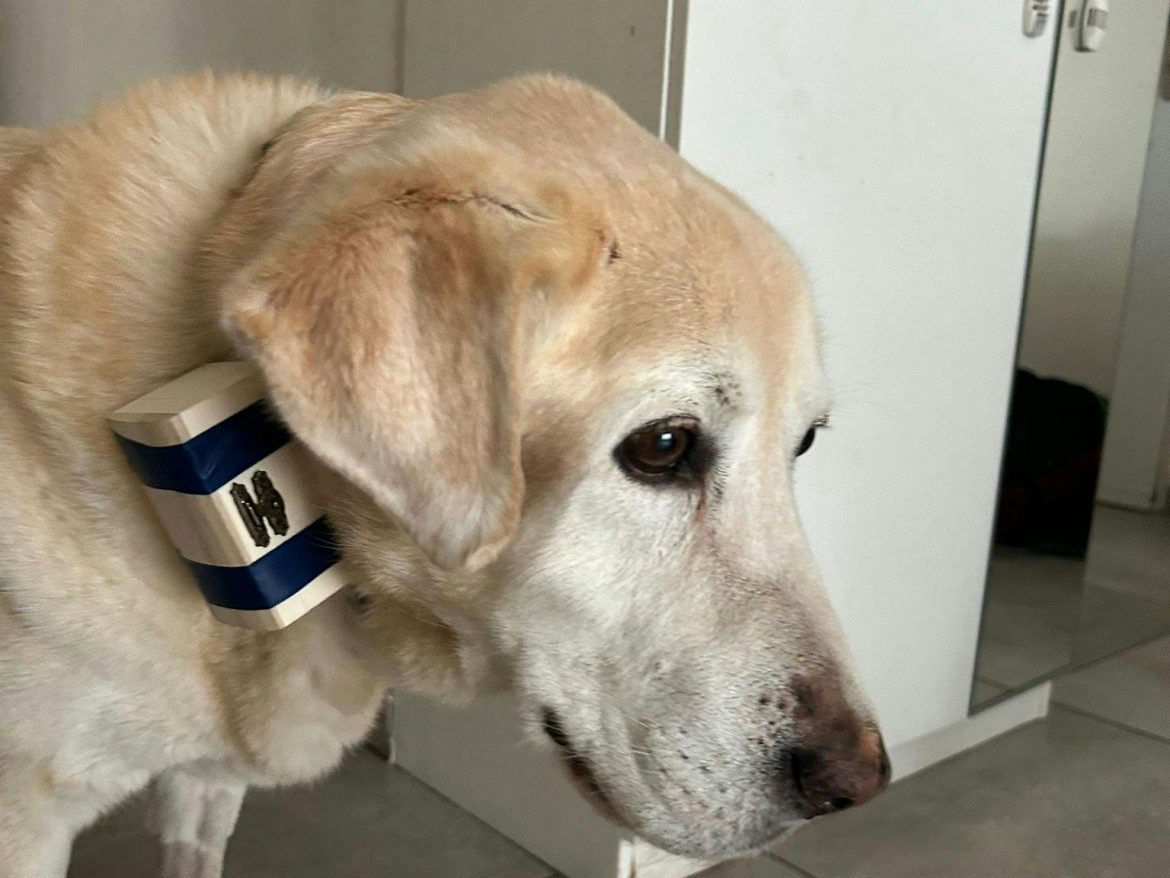
This is Pie Pie. He’s a yellow lab, he’s 13, and for the last few months I’ve been watching him like a hawk trying to figure out if he’s fine or if something’s wrong.
The problem with senior dogs is they sleep a lot normally. So when my dog sleeps 18 hours a day, is that his new baseline or is something off? By the time a limp or a whine shows up, you’ve usually missed weeks of warning signs.
My vet basically said “keep an eye on his activity patterns.” Cool. How.
Commercial dog activity trackers start at $200+ and require a monthly subscription. For a 13-year-old dog whose range is “the yard and the couch, ” I didn’t need GPS or cellular. I just needed to see his activity pattern. So I built one.
How It WorksA tiny box on his collar contains:
- WeMos D1 Mini Pro (ESP8266) – microcontroller + WiFi
- MPU-6050 – 3-axis accelerometer + gyro
- TP4056 – LiPo charging circuit
- LiPo battery – 3.7V, ~500mAh
Every ~100ms the D1 Mini reads the accelerometer, computes magnitude = sqrt(x² + y² + z²), subtracts gravity (~9.81), and classifies the state:
- magnitude < ~1.0 → Resting
- 1.0 ≤ magnitude < 1.5 → Walking
- magnitude ≥ 1.5 → Active / Running
When the state changes, the D1 Mini pushes it over WiFi (HTTP POST) to a small dashboard endpoint. My phone gets a push notification (“Pie Pie is now Active/Running”) and the day’s pattern logs so I can compare today to last week.
It’s not a medical device. It’s the closest thing a regular person can build to “is my dog doing okay today” without a subscription.
Circuit OverviewMPU-6050 → D1 Mini (I²C):
- VCC → 3V3
- GND → GND
- SCL → D1
- SDA → D2
Power (TP4056 charger):
- BAT+ / BAT− → LiPo battery leads
- OUT+ / OUT− → D1 Mini 5V / GND
- Flash the firmware first – easier before the board is in the enclosure. Install the ESP8266 core in Arduino IDE, set the board to LOLIN(WEMOS) D1 mini Pro, set WiFi credentials + phone endpoint URL at the top of the sketch, and upload.
- Wire the MPU-6050 to the D1 Mini over I²C (VCC/GND/SCL/SDA as above). Open the Serial Monitor – you should see accelerometer values updating.
- Wire the TP4056 between the LiPo and the D1 Mini. Double-check polarity before connecting the battery; LiPos do not forgive reverse polarity.
- Test on the bench. Shake the assembly – both the Serial Monitor and your phone endpoint should show state transitions Resting → Walking → Active.
- Mount in the enclosure. I used a small plastic food container. Battery on the bottom, D1 Mini on top, MPU-6050 taped in a fixed orientation so accelerometer axes stay consistent.
- Seal the lid and velcro the enclosure to the collar. Run two zip ties through the box and around the collar as a mechanical backup (see “Tips and Lessons Learned” – velcro alone will fail on a moving dog).
Real lesson from a week of dog-testing: do not trust velcro alone. Pie Pie shook the enclosure off inside 24 hours on the first build. What actually worked:
- Velcro to hold the enclosure flat against the collar
- Plus two zip ties through the box and around the collar for structural hold
- Enclosure positioned on the underside of the collar (less impact when he rolls, less visually annoying)
- Jumper wires vibrate loose on a moving dog. Within a week the first build was half disconnected. Solutions, in order of durability: tape the headers down (minimum), solder everything (better), use heat-shrink tubing on each joint (best).
- Thresholds are breed-dependent. 1.5G is too sensitive for a large calm dog. For Pie Pie (a big lab) 1.8–2.0G works better. Small or high-energy dogs need different values. Watch raw values for a few hours, then set thresholds where your dog’s resting / walking / running clearly separate.
- Push on state change only. Pushing every sample will spam your phone, kill the battery, and tell you nothing new. Only send when the classified state changes, and add a small hysteresis so a one-frame blip doesn’t fire a notification.
- Seal the cable entry if you live somewhere wet. If you do, use silicone, not hot glue – hot glue doesn’t bond to most project box plastics long-term.
Within about a week I had a real baseline for Pie Pie’s day:
- Morning walk – sharp activity spike
- Late morning – quiet rest, usually on the good couch
- Mid-afternoon – long rest (by far the biggest block of his day)
- Dinnertime – small pacing spike (genuinely surprising; I didn’t know that was a thing until the data showed it)
- Evening walk – second sharp spike
- Night – asleep
When that pattern changes, I’ll know on day one instead of day fourteen. That’s the whole point.
CreditsPlanning: I described what I wanted (“wearable WiFi activity monitor for a senior dog, under $20 in parts, no subscription”) to Make-It and it generated the initial parts list, wiring, and starter code. Threshold calibration and mount approach I figured out myself after a week with Pie Pie.
Dog modeling services: Pie Pie.
